
[ Click to "Submit a request" ]
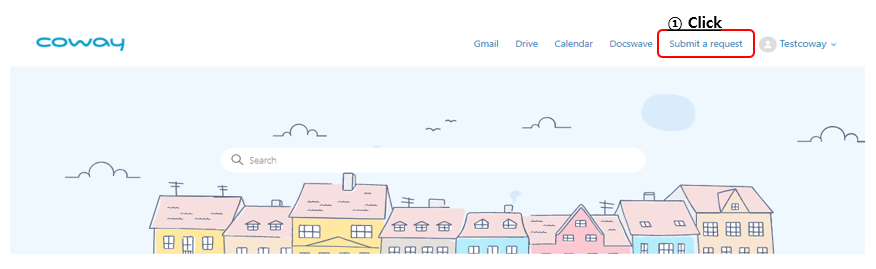
Click "Submit a request" at the top of the main screen of Zendesk.
[ Select "SAP Request" ]
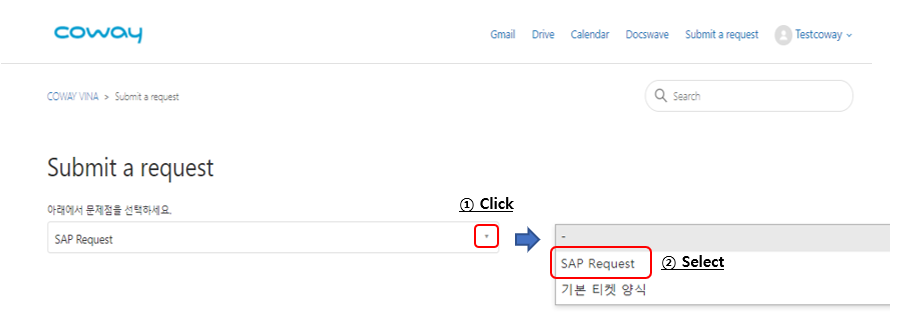
Click the "▼" and select "SAP Request"
[ Content Writing ]
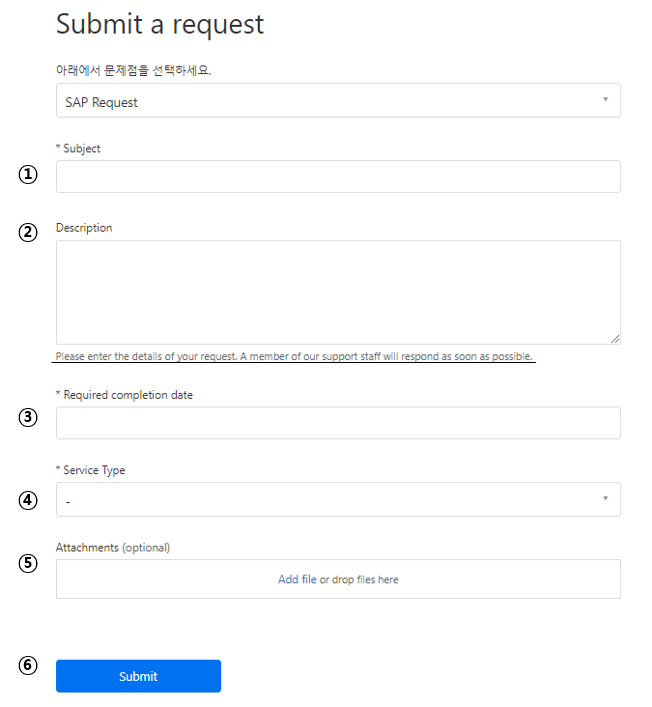
① Write "Subject " (*mandatory)
② Explain the request
- Please enter the details of your request. A member of our support staff will respond as soon as possible.
③ Enter the date you wish your request to be completed (*mandatory)
④ Select the type of your request (*mandatory)
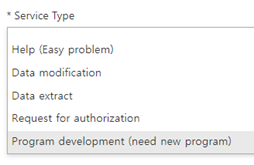
* Service Type
- Help(Easy Problem) : It means a simple questions or problem-solving requests for using SAP system.
- Data modification : To modify the improper data that user created or input.
- Data extract : To request data that user need for analysis.
- Request for authorization : Request for program authorization for new employee or department transfer.
- Program development : It means a request when a new program is needed for work performance.
⑤ Attach the file(s) to explain your request
⑥ Click "Submit"
Comments
0 comments
Please sign in to leave a comment.